





















 Cloud Login
Get the full overview
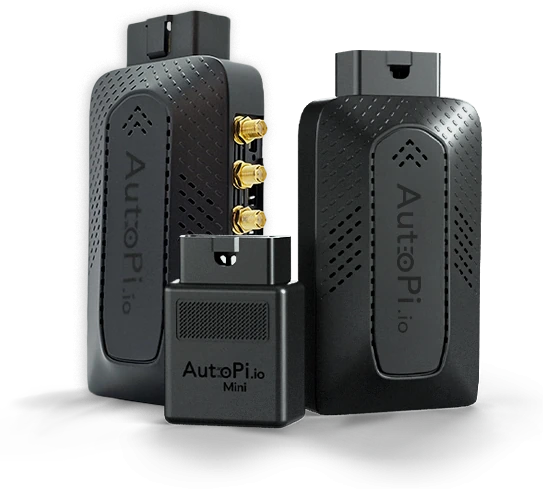
Compare all our devices
Compare all our available AutoPi devices side-by-side to help you choose the right hardware for your project. See a detailed overview of each device’s capabilities, core functions, and technical specifications.
Evaluate plug-and-play telematics for fleet tracking, edge computing for custom automotive applications, or high-performance CAN-FD data logging, you can quickly see how each model differs in interface support, data sampling, storage, connectivity, processing power, and expandability.
Compare devices
Three platforms built for different engineering requirements
AutoPi Cloud supports all three families; AutoPi Core runs on TMU CM4 and CAN-FD Pro. Choose based on your bus protocols, data collection workflow and edge compute needs. Vehicle signals depend on model, ECU access and configuration.
AutoPi Mini
OBD-II & EV telematics
Quick deploy · OEM parameters · fleet tracking

AutoPi Cloud is included with your Mini. Hardware starts at €129, with a required €6/month subscription for 12 months. Your subscription includes an AutoPi SIM with 100 MB/month; the first-year minimum is €201.
Explore configuration options and current pricing in the shop. Starting prices exclude taxes, shipping and accessories.
Order MiniAutoPi TMU CM4
Edge computing & CAN-FD
CM4 platform · Docker · custom software

AutoPi Cloud is included with your TMU CM4, with or without a subscription. Hardware starts at €235 with the subscription option. Choose the CAN 2.0/CAN-FD variant and payment option that suit your project. The subscription option costs €6/month for 12 months and includes an AutoPi SIM with 100 MB/month.
Explore configuration options and current pricing in the shop. Starting prices exclude taxes, shipping and accessories.
Order TMU CM4AutoPi CAN-FD Pro
Dedicated CAN-FD data logger
High-throughput · MDF4 / ASAM · edge compute

AutoPi Cloud and device software are included with your CAN-FD Pro. Hardware starts at €599. SIM and mobile data are purchased separately.
Explore configuration options and current pricing in the shop. Starting prices exclude taxes, shipping and accessories.
Order CAN-FD ProChoose Mini if…
You need OBD-II parameter logging, EV battery metrics or GPS fleet tracking. Fast deployment, minimal setup, rugged −40°C rating. No custom software stack needed.
Choose TMU CM4 if…
You need a Linux edge computer with Docker, custom Python services or on-device integration logic. Select the CAN 2.0 or CAN-FD variant for your network.
Choose CAN-FD Pro if…
You need dual-channel CAN-FD capture, ASAM MDF4 output, J1939 PGN logging on trucks/machinery, or hardware-backed signing for data integrity checks. Signing is a technical control, not certification or a guarantee of legal admissibility.
| Feature |
AutoPi Mini AutoPi Cloud is included with your Mini. Hardware starts at €129, with a required €6/month subscription for 12 months. Your subscription includes an AutoPi SIM with 100 MB/month; the first-year minimum is €201. Explore configuration options and current pricing in the shop. Starting prices exclude taxes, shipping and accessories. |
AutoPi TMU CM4 AutoPi Cloud is included with your TMU CM4, with or without a subscription. Hardware starts at €235 with the subscription option. Choose the CAN 2.0/CAN-FD variant and payment option that suit your project. The subscription option costs €6/month for 12 months and includes an AutoPi SIM with 100 MB/month. Explore configuration options and current pricing in the shop. Starting prices exclude taxes, shipping and accessories. |
AutoPi CAN-FD Pro AutoPi Cloud and device software are included with your CAN-FD Pro. Hardware starts at €599. SIM and mobile data are purchased separately. Explore configuration options and current pricing in the shop. Starting prices exclude taxes, shipping and accessories. |
|---|---|---|---|
| CAN Interface | |||
| CAN-FD channels | 0 - OBD-II / K-Line only | CAN-FD variant: 2 × CAN-FD (up to 5 Mbps); CAN 2.0 variant: no CAN-FD | 2 × CAN-FD (up to 5 Mbps) |
| Collection workflow | 4 samples/s (OBD polling) | 100 samples/s | >3,000 frames/s per channel |
| Timestamp precision | seconds (s) | microseconds (µs) | microseconds (µs) |
| J1939 (PGN/SPN) support | - | Yes | Yes - 29-bit, mask 1FFFFF00, active query |
| CAN silent (listen-only) mode | - | Yes | Yes |
| Hardware ID pass/block filters | - | Via DBC files | Per-frame hardware filters + DBC |
| CAN error frame logging | - | - | Yes |
| CAN transmit / RTR / heartbeat | OBD-II requests only | OBD-II requests only | Full transmit + RTR + heartbeat |
| Storage & Output | |||
| CAN log file formats | - | - | MDF4 · JSONL · CSV · LOG · ASC |
| ASAM MDF4 decoder | - | - | Yes - on-device, no server pipeline |
| Custom DBC decoding | - | Yes - via AutoPi Cloud | Yes - Standard + ASAM decoder |
| External storage (USB) | - | Can be added | Yes - included out of the box |
| AWS S3 sync | - | Yes - configurable | Yes - configurable interval + retry |
| Cyclic/rollover logging | - | - | Yes - oldest data purged first |
| Data compression | - | Yes - before upload | Yes - before upload or storage |
| Software & Edge Compute | |||
| Operating system | Proprietary closed-source | Raspbian + AutoPi Core (open-source) | Raspbian + AutoPi Core · Pro-extended |
| Docker container deployment | - | Yes - via AutoPi Cloud | Yes - SocketCAN access in container |
| Custom code / Python services | - | Yes - via AutoPi Cloud | Yes - via AutoPi Cloud |
| Frame listeners & event automation | - | - | Yes - handler / enricher / returner hooks |
| OTA updates & SaltStack config | Yes | Yes | Yes |
| Tailscale VPN / SSH access | - | Yes | Yes - device SSH from any network |
| Specification |
AutoPi Mini AutoPi Cloud is included with your Mini. Hardware starts at €129, with a required €6/month subscription for 12 months. Your subscription includes an AutoPi SIM with 100 MB/month; the first-year minimum is €201. Explore configuration options and current pricing in the shop. Starting prices exclude taxes, shipping and accessories. 63 g |
AutoPi TMU CM4 AutoPi Cloud is included with your TMU CM4, with or without a subscription. Hardware starts at €235 with the subscription option. Choose the CAN 2.0/CAN-FD variant and payment option that suit your project. The subscription option costs €6/month for 12 months and includes an AutoPi SIM with 100 MB/month. Explore configuration options and current pricing in the shop. Starting prices exclude taxes, shipping and accessories. 170 g |
AutoPi CAN-FD Pro AutoPi Cloud and device software are included with your CAN-FD Pro. Hardware starts at €599. SIM and mobile data are purchased separately. Explore configuration options and current pricing in the shop. Starting prices exclude taxes, shipping and accessories. 170 g |
|---|---|---|---|
| Compute | |||
| Processor | Proprietary MCU | BCM2711 Quad-core Cortex-A72 @ 1.5 GHz | BCM2711 Quad-core Cortex-A72 @ 1.5 GHz |
| RAM | Proprietary | 1 GB LPDDR4 | 4 GB LPDDR4 |
| Storage | Proprietary | 8 GB eMMC | 32 GB eMMC + USB expansion |
| Connectivity | |||
| Cellular modem | 4G/LTE Cat 1 · 2G fallback | 4G/LTE Cat 4 · 150 Mbit DL · 3G/EDGE fallback | 4G/LTE Cat 4 · 150 Mbit DL · 3G/EDGE fallback |
| WiFi | - | 2.4 GHz + 5 GHz 802.11 b/g/n/ac | 2.4 GHz + 5 GHz 802.11 b/g/n/ac |
| Bluetooth | BT 4.0 + BLE | BT 5.0 + BLE | BT 5.0 + BLE |
| Antennas | 1× 4G internal · 1× GPS internal | 2× 4G patch · 1× GPS ceramic · 1× WiFi/BLE PCB | 2× 4G SMA · 1× GPS SMA · 1× WiFi/BLE SMA (external) |
| Automotive Interface | |||
| Bus interface | K-Line · CAN (OBD-II only) · ISO 9141/14230/15765 | 2× CAN 2.0 or 2× CAN-FD up to 5 Mbps, depending on variant · DoIP requires compatible expansion | 2× CAN-FD up to 5 Mbps · mixed 11/29-bit · DoIP upgradeable |
| Power input | 10–30 V DC · battery drain protection · 170 mAh backup | 12–35 V DC · 12 V / 24 V / 35 V vehicles | 12–35 V DC · 12 V / 24 V / 35 V vehicles |
| GPS/GNSS | GPS + A-GPS | GPS / GLONASS / BeiDou / Galileo / QZSS + A-GPS | GPS / GLONASS / BeiDou / Galileo / QZSS + A-GPS |
| IMU (accelerometer + gyroscope) | 3-axis accelerometer only | 3-axis accel + 3-axis gyroscope | 3-axis accel + 3-axis gyroscope |
| Security & Environment | |||
| Secure element | - | NXP SE051 - RSA/ECC/AES/SHA, ECC curves, intrusion detection | NXP SE051 - cryptographic data signing for tamper-evident logs |
| IP67 waterproof casing | - | Optional add-on | Optional add-on |
| Operating temperature | −40°C to +85°C | −20°C to +70°C | −20°C to +70°C |
| Certifications | CE/UKCA/E-Mark/EAC/RCM/RoHS/REACH | EN 301 489 · EN 55025 · ISO 7637-2 · FCC Part 15 | EN 301 489 · EN 55025 · ISO 7637-2 · FCC Part 15 |
| Datasheet | Download PDF | Download PDF | Download PDF |
J1939 Ready
Connect AutoPi devices to heavy machinery with J1939 adapters
Purpose-built J1939 adapter cables give direct access to the heavy-duty network on trucks, excavators and construction equipment - including connectors for Cummins, Caterpillar, Komatsu and other major OEMs. The standard adapter range covers OBD-II, power cables, splitters and vehicle-specific connectors for light-duty fleets.
This keeps installation straightforward across vehicle types, preserves access to existing diagnostic ports and avoids custom hardware for each project.
Female CAN bus cable with open wires

OBD-II to dual DB9 adapter

Cummins-Komatsu truck 12-pin J1939 to 16-pin OBD-II adapter

Cummins 9-pin J1939 (J1708) to 16-pin OBD-II adapter cable

Caterpillar (538-5051) truck 9-pin J1939 to 16-pin OBD-II adapter

Hardware
Choose your evaluation device
Start with the hardware your project needs. Software and connectivity terms differ by device and purchase option. Prices below exclude VAT, duties, shipping and optional accessories.

Dual CAN-FD data logger
High-throughput raw frame capture on two independent CAN-FD channels. On-device DBC decoding, ASAM MDF4 output, J1939 native support and hardware-encrypted data signing - all on a Raspberry Pi CM4.
Fleet telematics & OBD-II
OBD-II and supported EV telemetry with GPS and built-in 4G/LTE. Check your exact vehicle, required signals and regional variant; installation and configuration needs vary.
Edge compute platform
Raspberry Pi CM4-based telematics unit for custom software stacks. Run Docker containers, Python services and CAN-FD logging on the same device - managed remotely via AutoPi Cloud.
Frequently asked questions
AutoPi offers three main device families: the AutoPi Mini, the AutoPi TMU CM4, and the AutoPi CAN-FD Pro.
The Mini is designed for quick deployments where you want a compact unit for tracking and vehicle parameter data (OBD/OEM signals depending on the vehicle). The TMU CM4 is a Raspberry Pi Compute Module 4 based platform intended for projects that require customization, integrations, and running your own software on-device. The CAN-FD Pro is intended for high-volume CAN/CAN-FD logging workflows where dense bus traffic and raw frame capture matter.
All devices can be used with AutoPi Cloud for fleet and device management, and they can also be integrated into existing systems depending on your requirements.
Start with what you need to collect and how you plan to use the data.
Choose the Mini when you mainly need GPS tracking and vehicle parameters via standard interfaces, and you want a simple install. Choose the TMU CM4 when you need control over the software stack (custom services, integrations, edge logic), or when your project requires a Raspberry Pi base. Choose the CAN-FD Pro when you need high-volume raw CAN/CAN-FD frame logging, dense bus capture, or workflows where timestamp precision and storage matter.
If your project depends on specific OEM signals, the practical answer is usually: validate on a representative vehicle early. Availability can vary by make, model, and ECU configuration.
The available data depends on the device and the vehicle.
On many vehicles you can collect position (GPS), power and ignition related data, and standard OBD-II parameters. On some vehicles you can also extract OEM-specific signals, including EV-related values, but this depends on what the vehicle exposes and what protocols are available.
For CAN/CAN-FD projects, raw frame collection is typically the right approach when you need full control over decoding and post-processing. For parameter-style collection, the device reads and reports values that the vehicle makes accessible through supported interfaces.
Yes, but not all devices are intended for the same CAN workflows.
The CAN-FD Pro is designed for high-volume CAN/CAN-FD logging and raw frame capture. TMU CM4 is available with two CAN 2.0 or two CAN-FD interfaces, depending on variant; select the CAN-FD variant if your network requires it. The Mini is generally used for OBD-style parameter collection and tracking rather than full CAN/CAN-FD bus logging. Capture rate depends on configuration; see the device datasheet. Polling samples/s and raw frames/s are not interchangeable metrics.
If your goal is a full bus dump or dense CAN-FD traffic capture, the CAN-FD Pro is typically the correct starting point.
This depends on the device family.
The TMU CM4 is the main platform for custom software, since it is built around a Raspberry Pi Compute Module 4 and is intended for running your own services and integrations. Depending on your workflow, this can include containerized workloads and device-side logic that interacts with vehicle interfaces and cloud services.
The CAN-FD Pro focuses on logging workflows and is usually used as a dedicated logger integrated into a broader pipeline. The Mini is designed for simpler deployments and is not intended as a general-purpose edge compute platform.
TMU CM4 is available with or without subscription and supports custom backend integrations. CAN-FD Pro includes free AutoPi software; SIM and mobile data are purchased separately. Mini requires the AutoPi SIM and Cloud subscription for 12 months. An integration does not remove that commitment.
For standalone or enterprise Cloud deployments, request a project-specific proposal covering device count, hosting, connectivity and support.
Mini starts at €129 plus a mandatory €6/month AutoPi SIM and Cloud subscription for 12 months, with 100 MB/month: a €201 first-year minimum. TMU CM4 starts at €235, with or without subscription; price depends on CAN 2.0/CAN-FD variant and payment selection. Its subscription option is €6/month for 12 months with 100 MB/month. CAN-FD Pro starts at €599 with free AutoPi software; SIM and mobile data are purchased separately.
Starting prices exclude taxes, shipping and accessories. Confirm your selected configuration and current terms in the shop.
Yes. In addition to standard customer support, we also offer development hours for teams that want help with integration, configuration, or device-side development.
This is typically used for things like: validating data availability on a target vehicle, building a proof-of-concept pipeline, setting up logging or storage workflows, or integrating device data into an existing application.
Many teams start with a small scoped engagement to remove early technical risk before scaling a deployment.
Plan for a quick validation step on a representative vehicle.
OEM and EV signals vary significantly across vehicle platforms, model years, trim levels, and ECU configurations. Even when a protocol is supported, the specific signals you need may require OEM PID access, UDS workflows, or raw CAN decoding with DBC definitions.
The most reliable process is to define a short list of required signals, test against a real vehicle, and confirm the extraction path (parameter-based vs raw frames). If needed, we can support this step through development hours.
Hardware support means the interface exists physically on the device (for example CAN-FD, USB, Ethernet, GNSS, modem). Software support means the feature is available as a shipped capability in the device stack or platform.
Some features also fall into a third category: available through configuration. That typically means the capability exists, but you must enable it, configure it, or implement parts of the workflow (for example decoding, filtering, uploading, or storage strategy).
This distinction matters most for advanced vehicle access and high-volume logging projects, where the interface is only one part of the complete solution.
Orders are typically shipped within a few business days, and most items are kept in stock. When your order is dispatched, you receive tracking information so you can follow the shipment.
Delivery time depends on destination and carrier service. If your project has a hard deadline, it is usually best to place the order early and plan time for a short validation phase before scaling.
If you need help choosing a device or validating a specific data requirement, the fastest approach is to contact us with (1) the vehicle type, (2) the signals you need, and (3) what you plan to do with the data (logging, streaming, dashboards, exports, integrations).
You can reach out to us and we will help you narrow down the device choice and identify the right validation steps before you commit to a larger rollout.
Still have questions?
Get in touch with us - we're ready to answer any and all questions.