
















 Cloud Login
Delivering quality telemetry data from all types of machinery, trucks and vehicles
Open IoT stack for CAN/CAN-FD/J1939 data logging, edge execution and cloud orchestration with Core, Cloud and API integration
CAN / CAN-FD / J1939 / OBD-II. Capabilities depend on the device and vehicle.
- Devices deployed
- 45,000+
- Clients worldwide
- 850+
Data logging platform for vehicles, equipment and machinery
Build a vehicle-data solution around your requirements, rather than changing your project to fit a fixed tracker. Choose supported OBD-II telemetry with Mini, custom edge applications with TMU CM4, or dual-channel capture with CAN-FD Pro.
For a proof of concept, purchase your evaluation devices and work with our engineers to extract data from your vehicles. Where needed, we help with signal discovery and reverse engineering. Agree the scope and validate the required signals before planning a rollout.
In stock | Order now -> Ships tomorrow.
Data logger for dual CAN / CAN-FD
AutoPi CAN-FD Pro
NEW
Native J1939 support for trucks, excavators, agricultural and construction machinery - connect via standard J1939 adapter cables without extra configuration.
Records dual CAN-FD streams at over 3000 frames/sec with 4 GB RAM and 32 GB on-board storage for uninterrupted logging in the field.
Built around Raspberry Pi Compute Module for customizable edge applications.
Extendable with additional storage, external inputs, rugged mounting and IP67-rated enclosures for harsh environments.
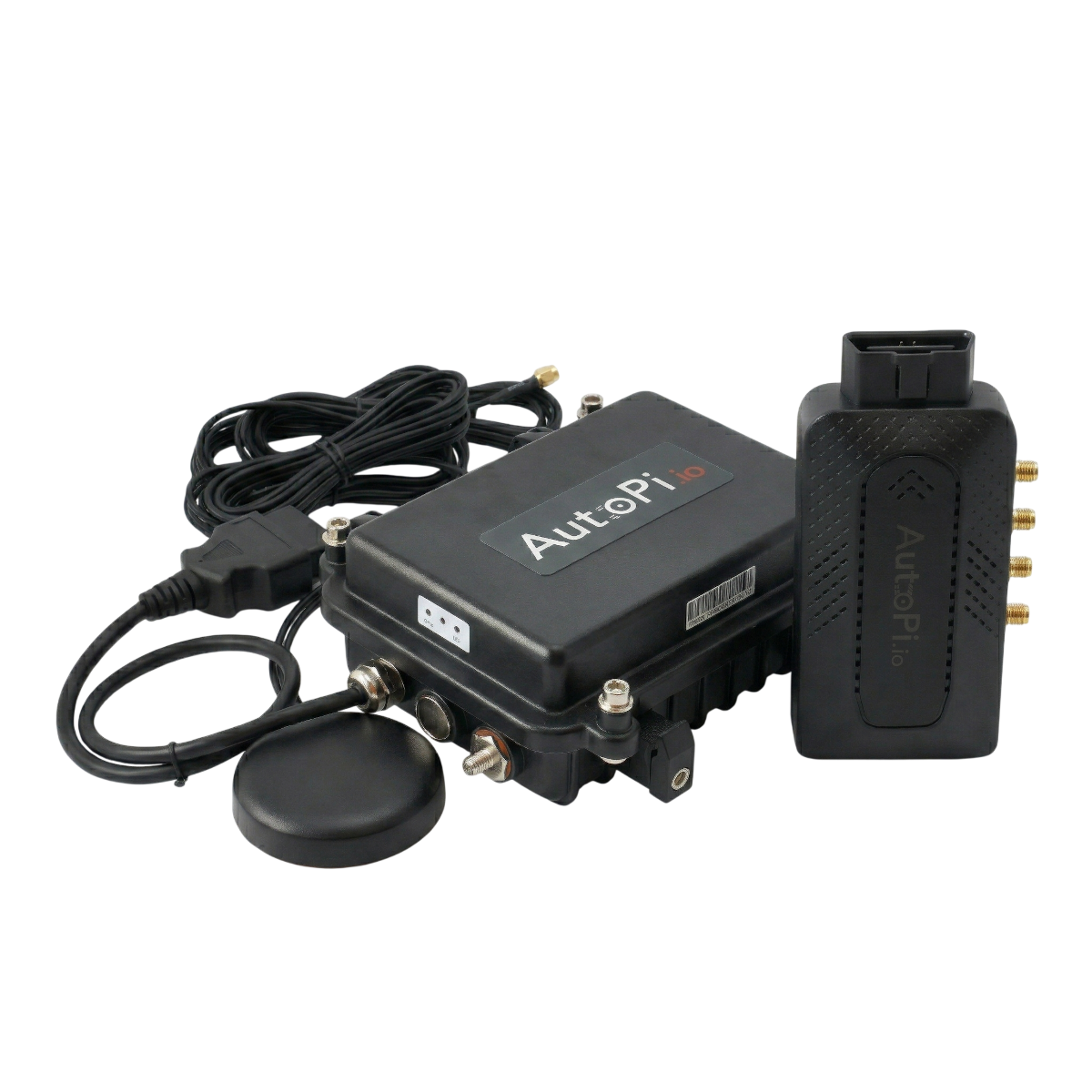
Rugged IoT device for industrial machinery
AutoPi TMU CM4
UPGRADED
Built on Raspberry Pi Compute Module 4 with open-source software stack for customization and J1939 protocol support.
Designed for edge computing with Docker, Tailscale and AutoPi Cloud for remote access and management in remote or off-grid environments.
Extendable with AutoPi HAT solutions, external antennas and IP67-rated industrial enclosures for harsh field deployments.

OBD-II data logger for tracking and EV parameters
AutoPi Mini
UPGRADED
Plug-and-play OBD-II device for OEM parameter logging and EV-specific telemetry.
Well suited for EV battery monitoring, range analysis and usage-based applications. Data can be sent to third-party cloud platforms or handled through AutoPi Cloud.
Can be combined with AutoPi Fleet Management for vehicle tracking, usage data and basic diagnostics.

AutoPi Cloud
Control plane for logging,
events and fleet operations.
AutoPi Cloud provides a unified control plane for channel configuration, logger lifecycle management, decoder setup, output routing, frame listeners and event reactors - configurable remotely per device, group or project. Templates apply repeatable configuration at fleet scale. Cloud access is included with every AutoPi device.

Channel logging and decoder control
Configure named loggers per channel (can0/can1) with pass/block ID filters, rollover size and S3 sync interval. Select Standard (CSV/JSONL/LOG) or ASAM (MDF4) decoding per logger and import DBC files with per-signal selection. J1939 PGN/SPN and 29-bit identifiers handled natively.
Docker and workflow hook deployment
Deploy Docker containers to supported Linux-based TMU CM4 and CAN-FD Pro devices through Cloud. On CAN-FD Pro, workflow hooks can be attached to frame listeners; supported processing depends on device and configuration. AutoPi Mini uses its own firmware and does not run the AutoPi Core Docker stack. See the device comparison for capability differences.
Centralized configuration at scale
On supported Linux-based devices, define and apply templates across groups or projects for channel configuration, logger setup, output workers and upload policies. Changes propagate via SaltStack when the device next connects. Available settings depend on device capabilities; configuration is auditable and version-tracked in Cloud.
Remote firmware and application rollout
For supported Linux-based devices, deploy firmware updates, base images and Docker containers remotely. Cloud tracks rollout progress and supports rollback; available update types depend on device and configuration. Output worker intervals, retry counts and sync behavior can be set in applicable update policies.
REST API for supported Cloud operations
Use the REST API at api.autopi.io for supported device configuration and Cloud data operations, including logger setup, event queries and trip retrieval. Available operations depend on device capabilities and Cloud configuration. MQTT is available for real-time data streams.
Event stream, trip correlation and diagnostics
Monitor device health, trip telemetry and the live event stream from one dashboard. Filter events by tag and time window - including autodetect results, logger state changes and S3 sync confirmations. Correlate CAN logging behavior with trip records and trigger targeted diagnostics for devices that deviate from baseline.
J1939 Ready
Connect AutoPi devices to heavy machinery with J1939 adapters
Purpose-built J1939 adapter cables give direct access to the heavy-duty network on trucks, excavators and construction equipment - including connectors for Cummins, Caterpillar, Komatsu and other major OEMs. The standard adapter range covers OBD-II, power cables, splitters and vehicle-specific connectors for light-duty fleets.
This keeps installation straightforward across vehicle types, preserves access to existing diagnostic ports and avoids custom hardware for each project.
Female CAN bus cable with open wires

OBD-II to dual DB9 adapter

Cummins-Komatsu truck 12-pin J1939 to 16-pin OBD-II adapter

Cummins 9-pin J1939 (J1708) to 16-pin OBD-II adapter cable

Caterpillar (538-5051) truck 9-pin J1939 to 16-pin OBD-II adapter

AutoPi Solutions
Three platforms. One operational model.
Choose hardware to match your signals, compute and installation requirements. CM4 and CAN-FD Pro run the open-source AutoPi Core stack; Mini provides supported OBD-II and EV telemetry through its own firmware. Cloud features and purchase terms depend on the device and deployment.
AutoPi CAN-FD Pro
Dedicated dual-channel J1939 and CAN-FD data logger for trucks, excavators and construction machinery.
- → Dual independent CAN-FD channels (can0/can1), up to 5 Mbps per channel, >3,000 frames/sec
- → Native J1939 PGN/SPN handling with 29-bit identifiers, pass/block filters and DBC decoding
- → Standard (CSV/JSONL/LOG) and ASAM (MDF4) decoder outputs with on-device signal selection
- → 4 GB LPDDR4, 32 GB eMMC, 4G/LTE, GPS, NXP SE051 secure element, Tailscale SSH
- → 12–35V DC input - compatible with 12V, 24V and heavy-duty truck electrical systems
AutoPi TMU CM4
Raspberry Pi CM4-based IoT platform for custom edge services, protocol adapters and industrial deployments.
- → Full CAN bus via SocketCAN with J1939 and OBD-II protocol support
- → Docker pre-installed for containerized custom applications and signal processing workloads
- → Compute headroom for local model inference, protocol translation and custom edge logic
- → Tailscale SSH for secure remote shell in off-grid and remote environments
- → Extendable with HAT solutions, external antennas and IP67-rated industrial enclosures
AutoPi Mini
Plug-and-play OBD-II logger for passenger vehicles, EV battery telemetry and high-volume light-duty deployments.
- → OBD-II PID queries with OEM parameter access and EV battery state-of-charge logging
- → Direct OBD-II port fit - no custom wiring or vehicle modification required
- → EV-specific parameters: SoC, range estimation, charge state and thermal monitoring
- → Data routable to AutoPi Cloud or third-party backends via HTTP REST and MQTT
- → Fleet management, trip tracking and basic diagnostics via AutoPi Cloud dashboard
Consistent operational model across all devices
AutoPi Core runs on supported Linux-based TMU CM4 and CAN-FD Pro devices with SocketCAN, Python and SaltStack. AutoPi Mini uses separate firmware; Cloud and REST API configuration depends on the device's supported capabilities. See the device comparison for differences and the AutoPi Core documentation for technical details.
In stock | Order now → Ships tomorrow.
Engineering Workflow
From protocol discovery
to production telemetry
The same workflow runs across pilots and full fleet deployments. Every step is configurable from the Cloud UI or REST API.
Discover the bus
Configure can0/can1 channels and select an autodetect strategy - Any (passive listen), OBD (active query), or J1939 (active PGN scan). Lock the confirmed bitrate and set per-channel termination, send and receive behavior.
Build the data pipeline
Create named loggers per channel with pass/block ID filters. Select Standard (CSV/JSONL/LOG) or ASAM (MDF4) decoding, import DBC files with signal selection, and configure rollover size, retry count and S3 sync interval.
Automate operations
Define frame listeners with ID/mask filters and bind event reactors to drive targeted actions on match. Chain workflow hooks - handler, converter, trigger, filter, enricher, returner - to build event-driven processing pipelines on-device.
Monitor and validate
Query runtime status per logger, inspect fps and active storage paths, and confirm S3 sync completion events on supported devices. Use Cloud dashboards, event tag filtering and the REST API to track health and throughput across connected devices.
// deployment roadmap
From proof of concept to deployment
Start with purchased proof-of-concept devices, then work with AutoPi engineers on vehicle data extraction, including reverse engineering where needed.
-
Purchase PoC hardware
Buy devices for testing on representative vehicles. Choose hardware appropriate to the vehicle interfaces and project requirements.
-
Agree signals and data destination
Define the signals, sampling needs, destination system and acceptance criteria with our engineers.
-
Validate data extraction
AutoPi engineers help test extraction and delivery, including reverse engineering where needed within the agreed scope. Record validated signals and remaining gaps.
-
Plan the rollout
Use the validation results to decide whether and how to expand, with installation, integration and support responsibilities agreed.
// deployment review
Your procurement checklist
Bring these requirements to the discussion. Confirm the agreed arrangements and terms in your proposal before committing to rollout.
- Hosting, data destination and retention
- Where data should go, hosting requirements, retention periods and deletion needs.
- Access
- Who needs device, platform and API access, and who manages permissions.
- Connectivity and region
- Deployment countries, network coverage, SIM and roaming requirements.
- Rollout, support and lifecycle
- Installation, provisioning, integration, updates, maintenance and escalation ownership; support responsibilities, lifecycle and warranty terms to be confirmed in the proposal.
// software foundation
Know your device software
TMU CM4 & CAN-FD Pro
Run open-source AutoPi Core.
AutoPi Mini
Uses different firmware; the same Core source access and customization capabilities do not apply to Mini.
Signal availability varies by vehicle. We agree engineering scope, costs, timing and acceptance criteria with you before starting the work, then use the PoC results to plan a supported rollout.
Discuss your proof of conceptFrequently asked questions
The right device depends on your bus type, required capture rate and compute needs. Here is a technical summary:
-
AutoPi CAN-FD Pro: Dual independent CAN-FD channels (can0/can1) up to 5 Mbps each, >3,000 frames/sec capture, native J1939 PGN/SPN support, Standard (CSV/JSONL/LOG) and ASAM (MDF4) on-device decoding, NXP SE051 hardware security element, 12–35V DC input. Choose this for heavy-duty J1939 machinery, dual-bus CAN-FD logging or projects requiring onboard DBC decoding.
-
AutoPi TMU CM4: Full CAN bus via SocketCAN on Raspberry Pi CM4, Docker pre-installed for containerized edge services, Tailscale SSH for remote shell access, extendable with HAT solutions and IP67 enclosures. Choose this for custom edge applications, protocol adapters or projects requiring compute headroom beyond logging.
-
AutoPi Mini: OBD-II PID query engine with EV-specific parameters (SoC, thermal, charge state), direct OBD-II port fit with no custom wiring. Choose this for light-duty passenger vehicle and EV fleet deployments.
If you are unsure, contact us - we will match the device to your bus type, protocol and output requirements.
AutoPi devices log CAN bus data using SocketCAN on Linux. The general flow for a CAN-FD Pro deployment is:
-
Channel configuration: Configure can0 and/or can1 with a fixed bitrate (e.g. 250000, 500000, 1000000) or run an autodetect strategy - Any (passive listen), OBD (active SAE J1979 query), or J1939 (active PGN scan). The autodetect result fires an event tag (
vehicle/bus/can0/autodetected) that can trigger downstream logic. -
Logger setup: Create named loggers per channel with pass/block ID filters (11-bit or 29-bit). Select a decoder - Standard outputs CSV, JSONL or LOG; ASAM outputs MDF4 with signal-level decoding from imported DBC files. For J1939, use a frame ID mask of
1FFFFF00to match PGN groups. -
Storage and upload: Logged files are written to local eMMC with configurable rollover size. An output worker syncs completed files to AWS S3 (or another endpoint) with retry count and sync interval controls. A sync completion event (
vehicle/bus/can0/logger/<name>/s3_sync/completed) confirms delivery. -
Automation: Frame listeners with ID/mask filters can fire event reactors and workflow hooks (handler, converter, trigger, filter, enricher, returner) on specific frame matches - enabling on-device anomaly detection, alerting or conditional logging.
See the CAN-FD Pro User Guide for a full walkthrough of channel setup, logger configuration and output routing.
AutoPi supports two onboard decoder engines, selectable per logger:
-
Standard decoder: Outputs raw or lightly processed CAN frames in CSV, JSONL or LOG format. Suitable for projects where decoding happens downstream (in Python, MATLAB, Vector Analyzer, etc.) or where raw frame capture is the primary requirement.
-
ASAM decoder: Outputs signal-decoded data in MDF4 format (ASAM MDF 4.x standard). Requires importing a DBC file and selecting the signals to decode. The device applies the DBC on-device and writes physical-unit values directly into the MDF4 file. This is the recommended format for J1939 PGN/SPN logging, measurement tools and integration with ASAM-compatible analysis platforms.
Both decoders can run simultaneously on separate loggers on the same channel - for example, one Standard logger capturing all raw frames and one ASAM logger decoding a specific J1939 PGN subset. Onboard decoding is available on the AutoPi CAN-FD Pro.
J1939 uses 29-bit extended CAN identifiers structured as PGN (Parameter Group Number) and SPN (Suspect Parameter Number). AutoPi handles this natively on the CAN-FD Pro:
-
Autodetect: The J1939 autodetect strategy actively scans for J1939 traffic and confirms bitrate and protocol automatically.
-
Frame ID filtering: Use a 29-bit pass filter with mask
1FFFFF00to match frames by PGN group without specifying every source address. This is the recommended mask for DBC-based J1939 decoding. -
DBC decoding: Import a J1939 DBC file, select the SPNs of interest, and the ASAM decoder will extract physical values (RPM, coolant temperature, fuel rate, etc.) directly on-device into MDF4 output files.
-
Query engine: The J1939 query type allows sending PGN requests at a configured interval and logging responses - useful for parameters not broadcast passively.
-
Adapters: Purpose-built J1939 adapter cables are available for Cummins (9-pin, 12-pin), Caterpillar (538-5051), Komatsu and other major OEMs - no custom wiring required.
Yes. AutoPi CAN-FD Pro and TMU CM4 run standard Linux (Raspbian) on Raspberry Pi Compute Module 4. Docker is pre-installed and managed through AutoPi Cloud:
-
Deploy Docker containers to individual devices, groups or entire projects from the Cloud UI or REST API.
-
Containers have access to SocketCAN interfaces (can0, can1), GPIO, serial and USB - enabling custom protocol translators, local ML inference, modem integrations and more.
-
Workflow hooks (handler, converter, trigger, filter, enricher, returner) can be attached to frame listeners or event reactors to build event-driven pipelines on-device without a full container.
-
Tailscale VPN is pre-configured, giving secure SSH access to the device shell from anywhere without firewall changes or static IPs.
The underlying AutoPi Core stack (SaltStack, Python, SocketCAN) is fully open-source and documented at docs.autopi.io/core.
AutoPi Cloud supports remote configuration according to the device capabilities. On CM4 and CAN-FD Pro, AutoPi Core applies configuration through SaltStack on the next connection. Mini uses its own firmware and supported settings:
-
Templates: Define a configuration template (channels, loggers, decoders, output workers, advanced settings) and apply it to a device, group or project in one operation.
-
API parity: Every Cloud UI operation is available through the REST API at api.autopi.io - including template application, logger control, event queries and OTA updates. Use it for infrastructure-as-code, CI/CD integration or custom management tooling.
-
Event stream: Monitor device state changes in real time via event tags - autodetect results, logger status transitions, S3 sync completions and disk housekeeper events are all surfaced as queryable event records in Cloud.
See docs.autopi.io/cloud for the full Cloud documentation.
AutoPi software is structured in three layers:
-
AutoPi Core: Open-source on-device stack running on Linux with SocketCAN, Python and SaltStack. Handles CAN channel management, logger execution, decoder pipelines, frame listeners, event reactors and workflow hooks. Documented at docs.autopi.io/core.
-
AutoPi Cloud: Hosted control plane at my.autopi.io for remote device configuration, fleet management, OTA updates and event stream monitoring. Included with every AutoPi device. Templates allow fleet-wide configuration rollout.
-
AutoPi REST API: Full API parity with the Cloud UI at api.autopi.io, plus MQTT for real-time data streams. Use the API to integrate AutoPi into existing backends, data platforms or deployment pipelines.
AutoPi devices are used across a broad range of industries wherever CAN bus or OBD-II data is needed:
-
Heavy machinery and construction: J1939 data logging on excavators, wheel loaders and trucks via Cummins, Caterpillar and Komatsu adapter cables. Log PGNs for engine load, fuel rate, coolant temperature and hours of operation.
-
CAN bus research and development: Capture dual raw CAN-FD streams at >3,000 frames/sec for protocol analysis, reverse engineering and DBC development. Export to MDF4, JSONL or CSV for offline toolchain integration.
-
EV battery monitoring: Log EV-specific OBD-II parameters including state-of-charge, battery temperature, charge state and range estimation via AutoPi Mini on passenger EVs.
-
Fleet telematics: Deploy AutoPi Cloud templates across vehicle groups for consistent channel, logger and upload configuration. Correlate CAN event streams with trip records and GPS telemetry.
-
Edge compute and custom integrations: Run containerized applications on TMU CM4 for protocol translation, local model inference or custom data pipelines with full SocketCAN access.
-
OEM and white-label products: AutoPi hardware and Cloud can be white-labeled, logo-free and custom-engraved for OEM projects. Custom OS images and private API access supported.
Want to discuss a specific use case? Contact us.
Yes, both AutoPi hardware and the Cloud platform support white labeling:
-
Devices can be ordered without the AutoPi logo. Custom engraving on the casing is available on request.
-
AutoPi Cloud can be white-labeled with your branding on the interface and subscription plans.
-
The device supports custom OS images - install your own Raspbian build, configure SocketCAN and AutoPi Core independently, or build on top of the open-source stack.
-
SIM card and connectivity management can be handed over to your own subscription infrastructure.
For white-label pricing and options, contact us.
Approximately 2-5 business days depending on your location. All devices are in stock and ship from Denmark.
-
Orders are dispatched within 48 hours of payment confirmation.
-
A tracking number is provided once the order has shipped.
-
We offer worldwide shipping. Devices are CE, FCC and RoHS certified for global deployment. If your country is not listed at checkout, contact us.
Still have questions?
Get in touch with us - we're ready to answer any and all questions.