






















 Cloud Login

Need a simple, practical intro to car key fobs?
A key fob is the small electronic device used to lock, unlock and authenticate access to a vehicle.
Earlier key fobs were mainly used for remote locking and unlocking.
Modern key fobs are more advanced. They can be part of keyless entry, push-button start, immobilizer validation, driver profiles and remote access workflows.
In many vehicles, the key fob is not only a convenience part. It is part of the vehicle access and security system.
It communicates wirelessly with the vehicle, and the result is often handled by body control modules, immobilizer systems, gateway ECUs and internal vehicle networks such as CAN or LIN.
At AutoPi, this topic comes up when customers work with mixed fleets, prototype vehicles or remote access systems.
If you need to plan access, monitoring or automated control workflows, it is useful to understand how the key fob communicates with the vehicle.
What Is a Key Fob?
A key fob is an electronic access device used to identify the driver and trigger vehicle functions.
In the simplest form, it sends a wireless command to lock or unlock the vehicle.
In more advanced systems, it is also used for passive entry, push-button start and immobilizer authorization.
Early key fobs used simple remote control functions. Later systems moved to radio frequency communication with rolling codes and encrypted authentication.
Today, a key fob normally works together with several vehicle modules.
This can include central locking, body control, immobilizer, gateway and sometimes telematics systems.
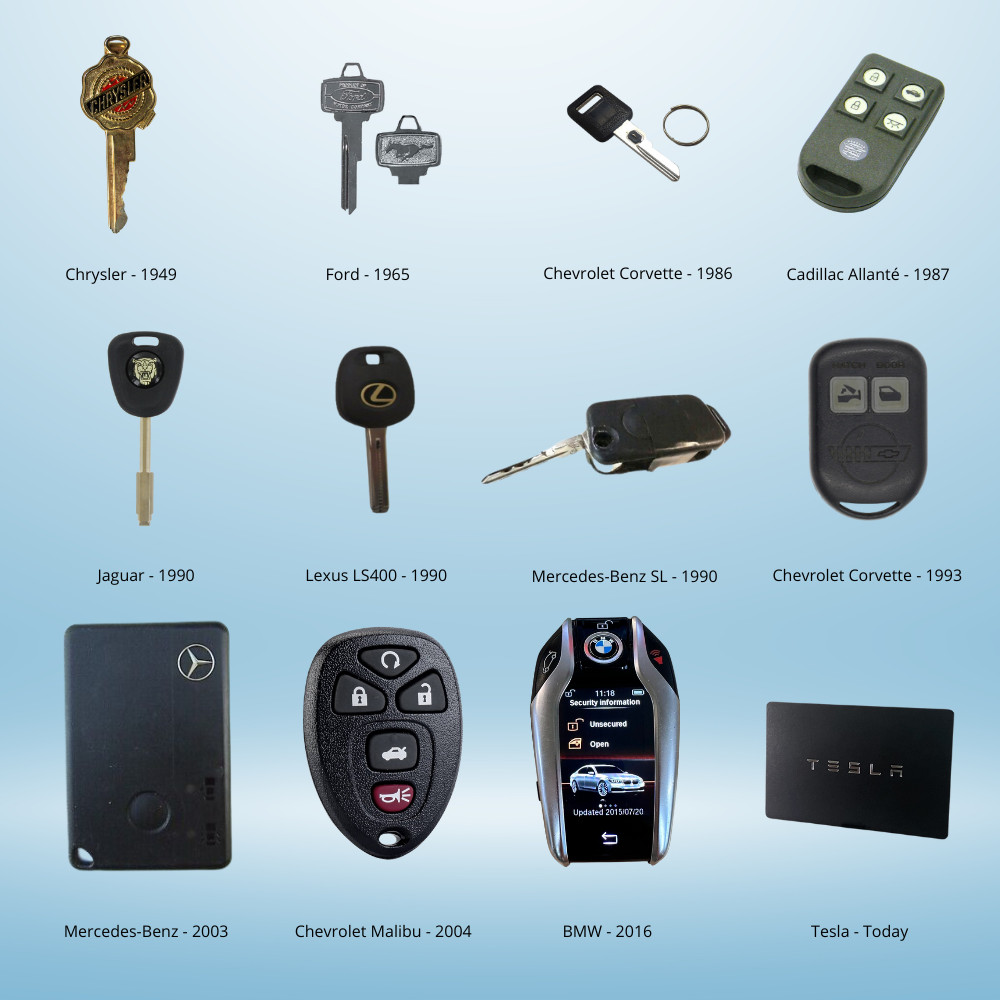
The physical form has also changed over time.
Some vehicles still use a traditional key with electronics inside it. Others use compact fobs, card keys or smartphone-based digital keys.
The reason is simple: vehicle access has become more software and electronics based.
Many key fob systems use RFID, low-frequency wake-up signals and radio-frequency command signals.
A common setup uses low-frequency signals around 125 kHz for proximity detection, and higher-frequency signals such as 315 MHz or 433 MHz for commands.
The exact frequencies and implementation depend on region, vehicle brand and model.
Systems with keyless entry or passive entry work by detecting if the fob is close enough to the vehicle.
The vehicle then performs a challenge-response authentication before allowing access or start authorization.
What Does “Key Fob” Stand For?
The word “fob” originally referred to a small pocket or chain used to carry small items.
In vehicle use, it simply means a small handheld electronic device used for access control.
The same word is also used for access fobs in hotels, offices and industrial buildings.
Types of Car Key Fobs
Several types of key fobs are used in modern vehicles:
- Standard fobs: Used for basic lock, unlock and trunk release functions with RF communication.
- Smart fobs: Used together with push-button start and immobilizer authentication.
- Proximity fobs: Used for passive entry and passive start, normally based on proximity detection and encrypted authentication.
How Key Fobs Work
A key fob works by sending an encoded wireless signal to the vehicle.
The vehicle receives the signal, checks if it is valid and then decides if the requested action should be allowed.
The outside looks simple, but inside the fob there is normally a small electronic circuit, a battery and a transmitter.

Most key fobs contain:
- Microcontroller: Stores control logic, authentication data and the code generation used by the fob.
- Coin cell battery: Provides power to the fob, often with CR2032 or CR2450 batteries.
- RF transmitter: Sends the lock, unlock or other command signal to the vehicle.
- LF coil: Used in some passive entry systems for proximity detection and wake-up communication.
When a button is pressed, the microcontroller creates an encoded command.
The signal is transmitted to the vehicle and received by the antenna or receiver module.
The vehicle checks the code against its expected authentication data.
If the code is valid, the action is allowed.
A simplified sequence looks like this:
- Input: The user presses a button or the vehicle detects the fob nearby.
- Code generation: The fob generates an encoded packet based on its stored keys or rolling code logic.
- Transmission: The fob sends the packet over RF.
- Reception: The vehicle receives the signal through its antenna system.
- Validation: The vehicle verifies that the signal is valid.
- Action: The vehicle locks, unlocks, starts or performs the requested function.
After the vehicle accepts the command, the action is often handled internally through body control modules, gateway routines and CAN or LIN messages.
This is why automotive data loggers can be useful when troubleshooting access-related issues.
Uses of Key Fobs
Key fobs are used for vehicle access, comfort functions and in some cases driver-specific settings.
The exact features depend on the vehicle and the key system.
Keyless Entry
Keyless entry lets the driver lock and unlock the vehicle without using a mechanical key.
The fob sends an encrypted command, and the body control module handles the central locking.
Keyless Ignition
Keyless ignition allows the driver to start the vehicle with a push button.
Before start is allowed, the vehicle checks that the valid fob is present inside or near the vehicle.
Remote Start
Remote start lets the engine or HVAC system start before the driver enters the vehicle.
This is useful in cold regions where preheating or defrosting is needed.
Trunk Release
Trunk release is a simple RF command used to open the trunk without touching the vehicle.
It is usually handled by the central locking or body control module.
Panic Alarm
The panic button activates the vehicle alarm.
This can be used if the driver needs to attract attention or locate the vehicle.
Driver Profiles
Some vehicles link a specific fob to a driver profile.
The vehicle can then adjust seat position, mirrors, climate settings or other preferences when that fob is detected.
Maintaining a Key Fob
A key fob can normally work for several years with very little maintenance.
The most common issue is a weak or empty battery.
Moisture, heavy impact or worn buttons can also cause problems.
Battery Replacement
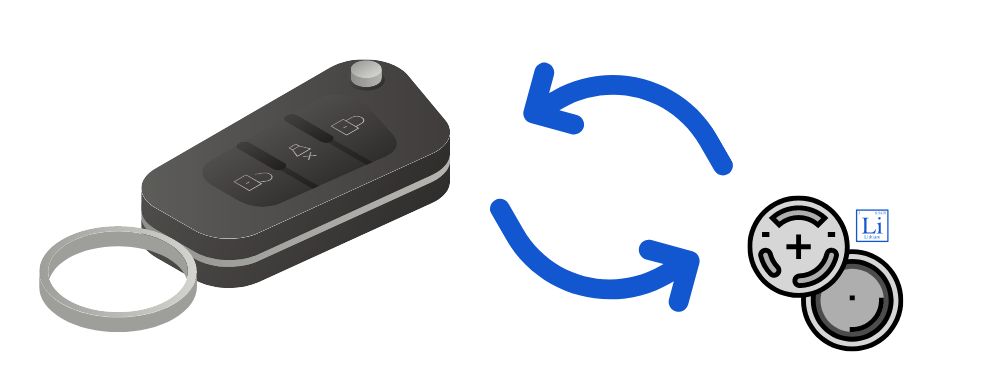
Battery replacement is normally simple.
Open the casing, remove the old battery, insert the new battery in the correct orientation and close the casing again.
After replacement, check that the buttons work and that the fob is detected by the vehicle.
When Replacement Is Needed
A fob may need replacement if the casing is broken, the PCB is damaged, the buttons stop working or the fob can no longer be synchronized with the vehicle.
Moisture damage can also cause unstable behaviour.
Cost Considerations
Replacement cost depends on the vehicle brand and fob type.
A basic RF fob is usually cheaper than a proximity fob with immobilizer pairing.
In many cases, replacement also requires programming or key provisioning by a workshop or dealer.
Troubleshooting Common Issues
Key fob problems can come from the fob itself, the battery, wireless interference or the vehicle receiver.
Start with the simple checks before assuming the vehicle has a larger access-system fault.
Signal Interference
- Check the environment: Move away from strong electromagnetic sources or crowded RF areas.
- Change position: Hold the fob closer to the vehicle or try another side of the vehicle.
- Check antennas: Confirm that vehicle antennas or receiver areas are not blocked or damaged.
Physical Damage
- Inspect the casing: Look for cracks, stuck buttons or signs of water ingress.
- Dry the fob: If moisture is suspected, remove the battery and allow the fob to dry properly.
- Replace if needed: Replace the fob if the electronics or PCB is damaged.
Security Concerns
Passive entry systems can be vulnerable to relay attacks if the system is not protected properly.
A relay attack extends the signal between the fob and the vehicle, so the car thinks the fob is nearby.
Faraday pouches, keyless-entry disabling modes and OEM software updates can reduce this risk.
Preventive Measures
- Function checks: Test lock, unlock and start functions regularly.
- Dry storage: Keep the fob dry and protected from hard impacts.
- Professional diagnosis: Use a workshop or diagnostic tool if the problem keeps returning.
Advanced issues can sometimes come from gateway modules, receiver modules or CAN communication faults.
In these cases, tools like the AutoPi CAN-FD Pro can provide insight into CAN, CAN-FD and LIN communication.
The AutoPi CAN-FD Pro is often used for debugging vehicle communication in prototype, fleet and integration projects.

The Future of Car Key Fobs
Car key fobs are moving toward more digital access systems.
Physical fobs are still common, but smartphone keys, biometric authentication and cloud-connected access systems are becoming more normal.
Biometric Authentication
Some prototype systems include fingerprint readers or other identity checks.
The goal is to connect the driver identity more directly to the access system.
Smartphone Integration
Digital keys are already used by several vehicle brands.
They are normally stored in secure smartphone environments and can use Bluetooth Low Energy, NFC or UWB.
This can reduce the need for a physical fob in some vehicle setups.
Connectivity Expansion
Future access systems may be connected to fleet platforms, dispatch tools or home automation systems.
This makes access control part of a larger connected vehicle workflow.
Market Trends and Innovations
- Stronger security: More advanced encryption, rolling-code logic and protection against relay attacks.
- Lower power use: More efficient fob designs with lower standby consumption.
- More customization: Better support for multi-driver vehicles and driver-specific settings.
Fob-related functionality becomes important when connected fleets need controlled access. Prototype projects often show how different OEM implementations can be, so access logging and reliable control logic are useful during both development and field testing.

Going Keyless with AutoPi
Keyless systems in fleets often need central control and audit logs.
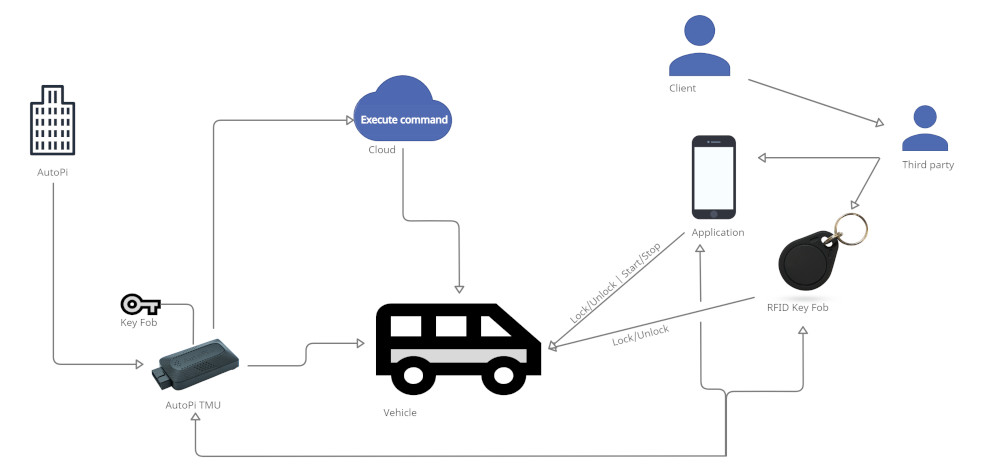
The AutoPi keyless entry solution integrates access control with fleet management and remote operation.
Vehicles can be locked, unlocked or started through secure channels managed in AutoPi Cloud.
This is used in rental fleets, industrial vehicle deployments and other setups where physical keys are difficult to manage.
AutoPi devices work as communication hubs between vehicle data, remote commands and real-time monitoring.
The system can integrate with existing fleet management software or operate as a standalone access solution.
Key features include:
- Centralized fleet control: Manage access without handing out physical keys.
- Remote access: Lock, unlock and authorize start from the platform where the setup supports it.
- Encrypted communication: Use secure communication channels between the vehicle, device and cloud.
- Platform compatibility: Integrate with existing fleet or management systems.
- Straightforward installation: Install the solution without making the access workflow more complex than needed.
Conclusion
Key fobs have moved from simple remote-control devices into important parts of the vehicle access system.
They are used for locking, unlocking, start authorization, driver profiles and remote access functions.
Modern fobs work together with body control modules, immobilizers, gateway ECUs and vehicle networks such as CAN and LIN.
For normal vehicle owners, the most common maintenance task is battery replacement.
For fleets and integration projects, the bigger topic is controlled access, logging and how the access system interacts with the rest of the vehicle.
Tools such as automotive data loggers can help when debugging irregular access behaviour or planning new vehicle functions.
As vehicles become more connected and software-defined, access control will also become more integrated with cloud platforms, mobile devices and fleet management systems.


