














 Cloud Login

LIN stands for Local Interconnect Network. It is a low-cost, single-wire communication protocol used in automotive electronics.
It is mainly used for simple body and comfort functions where CAN would be more expensive or more complex than needed.
Typical LIN applications include window regulators, mirror control, seat adjustment, rain sensors, climate flaps, steering wheel buttons and interior lighting.
These functions need reliable communication. But they do not normally need the speed or fault handling of a high-speed CAN network.
LIN is normally used together with CAN, CAN FD, Ethernet and other in-vehicle networks. CAN handles higher-speed and more critical control. LIN handles local low-speed sub-networks.
This separation keeps the vehicle architecture more simple and helps reduce wiring cost.
What is LIN bus?
A LIN bus is a small local communication network inside a vehicle.
It connects a controller with one or more simple devices over a single communication wire.
LIN uses a commander/responder structure. The commander node controls when communication happens. Responder nodes only transmit when they are asked to do so.
This makes LIN predictable and simple to implement.
For comparison, CAN is multi-master and designed for faster, more robust communication between ECUs. LIN is slower, more simple and cheaper.
For more background, see the guide on CAN bus.

LIN was introduced in the late 1990s as a cost-effective supplement to CAN bus.
Instead of using CAN for every switch, motor or sensor, manufacturers can place a LIN sub-network near the local function and connect it back to a higher-level ECU.
| Feature | LIN 1.x | LIN 2.0 | LIN 2.1 / 2.2A |
|---|---|---|---|
| Period | Late 1990s | From 2003 | From 2006 / 2010 |
| Maximum speed | Up to 20 kbit/s | Up to 20 kbit/s | Up to 20 kbit/s |
| Diagnostics | Basic | Improved | More standardized |
| Typical use | Simple actuator control | Body electronics and sensor networks | Modern LIN sub-networks in body and comfort systems |
LIN is important because it gives vehicle manufacturers a practical way to connect simple devices without adding a full CAN node for every function.
This reduces wiring complexity, component cost and software complexity in parts of the vehicle where high speed is not needed.
"LIN is useful because it solves a simple problem in a simple way. For local functions like switches, motors, and small sensors, it avoids using a more complex network than needed."

How does LIN bus work?
A LIN network normally consists of one commander node and multiple responder nodes.
The commander controls the schedule and sends frame headers. A responder node sends data only when the header matches the frame it is responsible for.
This makes LIN deterministic. Communication happens according to a schedule, so there is no arbitration between multiple transmitters like on CAN.
That is one of the reasons LIN is simple and low cost.
LIN is commonly used for functions such as:
- Window control: Used for switches, motors and position feedback in a door module.
- Seat adjustment: Used for local motor control, seat movement and memory positions.
- Climate control: Used for flap actuators, fan controls and local temperature sensors.
- Interior lighting: Used for local lighting modules and ambient light functions.
- Mirror control: Used for adjustment motors, heating, folding and position feedback.
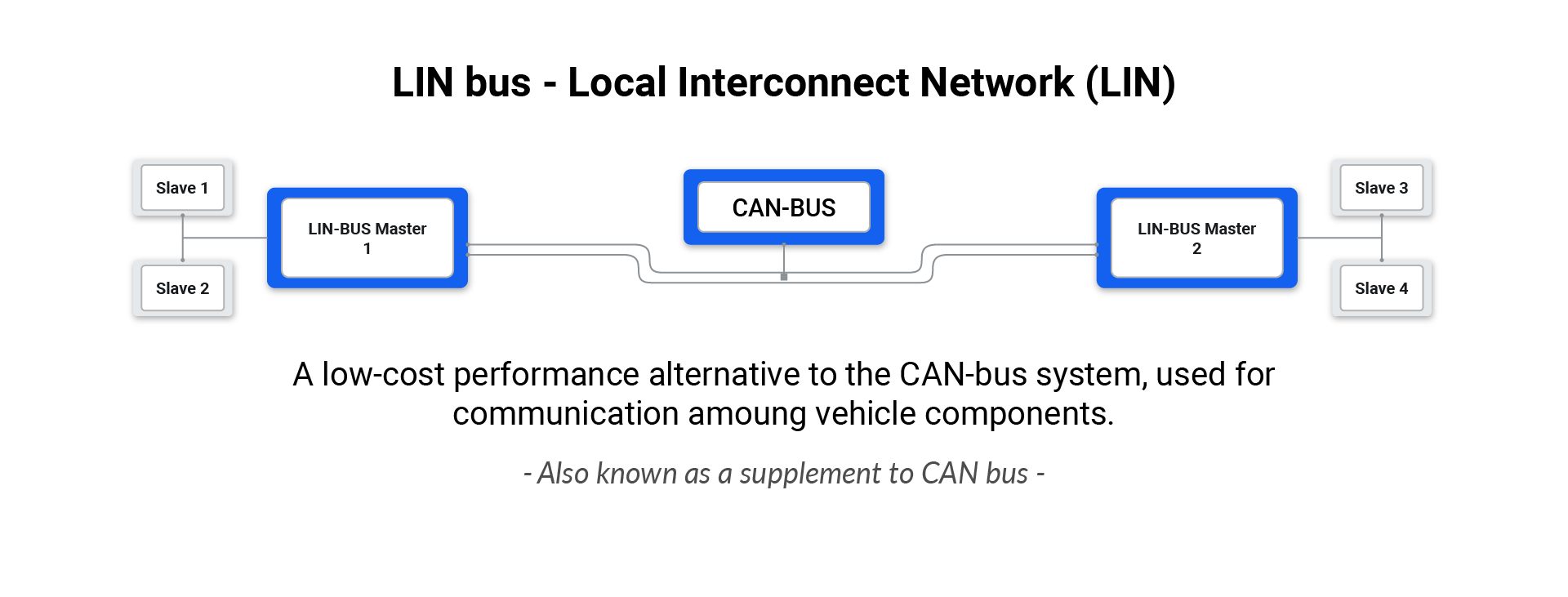
The commander node sends a header. The relevant responder node then places its response on the bus. Other responder nodes stay silent.
Since only the commander schedules communication, the bus is easy to predict and debug.
Malte from AutoPi describes it this way:
"LIN is not meant to compete with CAN. It is used where the job is local, low-speed, and cost-sensitive. That is exactly why it is still used in modern vehicles."
Logging LIN, CAN, and CAN FD data
LIN is often only one part of the vehicle communication architecture.
A practical data logging setup may need to collect CAN, CAN FD, OBD2, J1939 or LIN data depending on the vehicle and the project.
The AutoPi CAN FD Pro is designed for vehicle data logging projects where high-speed CAN and CAN FD are required.
It can be used together with other interfaces when a project needs broader vehicle network access.
For engineering and fleet work, the important step is to define which signals are needed before logging everything.
LIN data is useful when the project depends on body functions, local actuators, switches or low-speed sensors. CAN and CAN FD are normally more relevant for powertrain, chassis, battery and high-speed ECU data.

LIN frame types
LIN communication is based on frames.
A frame consists of a header sent by the commander and a response from a responder. Different frame types are used depending on how and when data should be transmitted.
| Frame type | Purpose | Typical use |
|---|---|---|
| Unconditional frame | Periodic data transmission | Regular sensor or actuator status updates |
| Event-triggered frame | Response when a defined event occurs | Door status, switch changes, or local events |
| Sporadic frame | Sent only when needed | User inputs or less frequent commands |
| Diagnostic frame | Diagnostic communication | System health monitoring and service routines |
| User-defined frame | Application-specific frame | OEM or project-specific use cases |
| Reserved frame | Reserved by the specification | Future or defined special use |
In practice, unconditional frames are the most common for simple periodic data.
Event-triggered and sporadic frames help reduce unnecessary traffic when values only change sometimes.
The LIN standards define how these frames are used and how nodes should behave on the network.
For engineering work, the important part is to know the frame schedule and the signal mapping. Without that, raw LIN data is difficult to interpret.
Benefits of using LIN bus
The main benefit of LIN is cost.
A LIN node is simpler than a CAN node, the wiring is simpler, and the protocol is easier to implement. This makes it suitable for functions where cost matters more than speed.
LIN also helps reduce wiring complexity. A local set of switches, motors and sensors can be connected on one LIN sub-network instead of running separate wires for every signal.
The commander/responder design also makes behaviour predictable. Since the commander controls the schedule, there is no bus arbitration between nodes.
This is useful for simple functions where deterministic timing is enough, but high-speed communication is not needed.
LIN bus vs. CAN bus
LIN and CAN are used for different jobs.
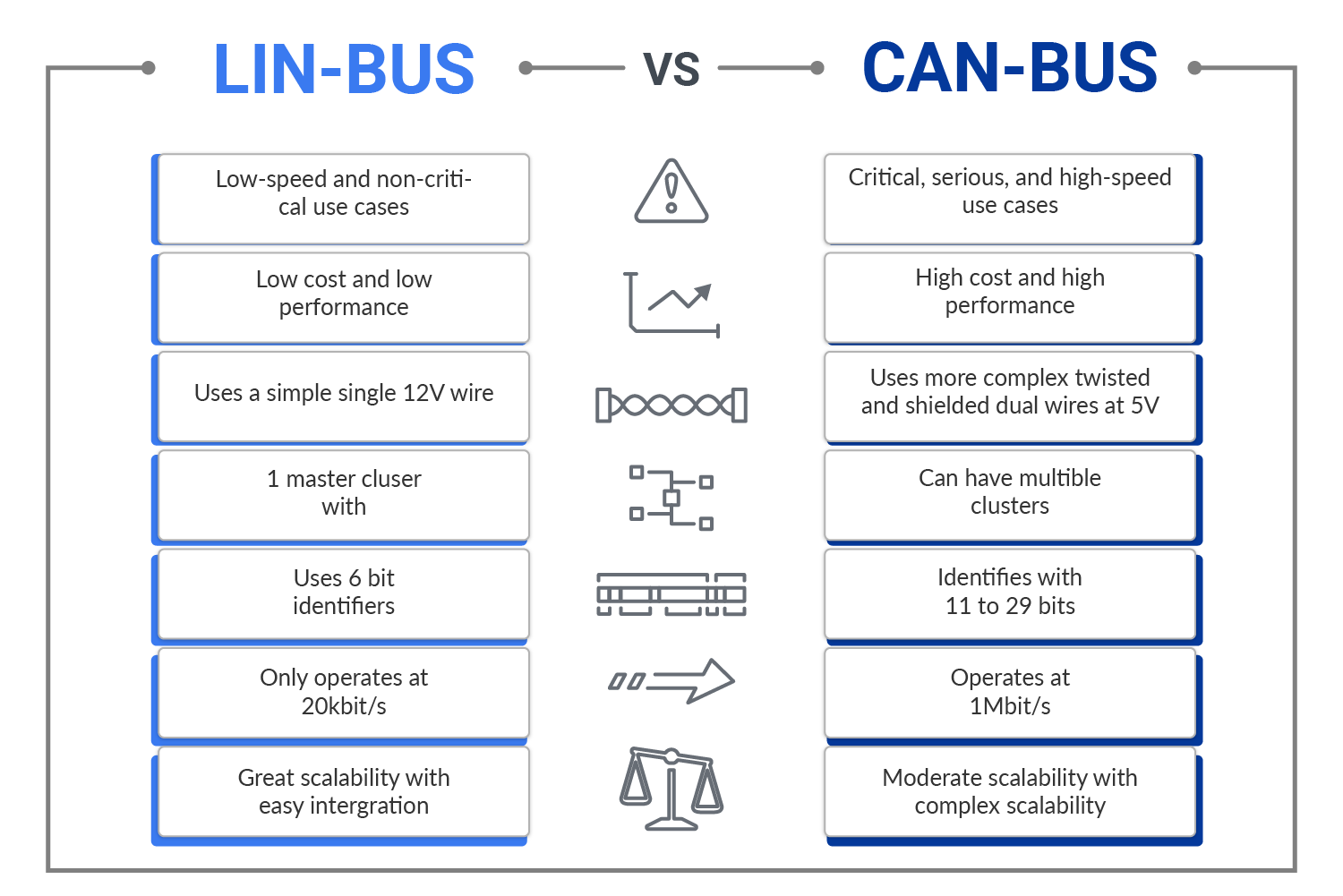
LIN is used for low-speed local sub-networks. CAN is used for faster and more important communication between ECUs.
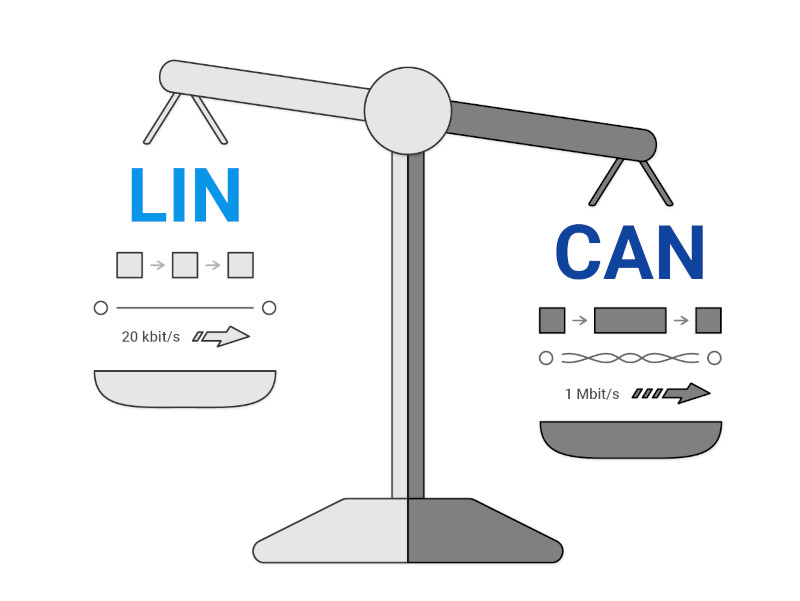
| Feature | LIN bus | CAN bus |
|---|---|---|
| Speed | Up to 20 kbit/s | Up to 1 Mbit/s for Classical CAN |
| Wiring | Single-wire communication | Two-wire differential bus |
| Network behavior | Commander/responder, scheduled communication | Multi-master with arbitration |
| Typical use | Windows, seats, mirrors, lighting, climate flaps | Powertrain, chassis, diagnostics, battery systems |
| Cost | Lower | Higher |
| Robustness | Suitable for local low-speed functions | Stronger error handling and better noise immunity |
In a modern vehicle, LIN and CAN are normally not competitors. They are used together.
LIN handles simple local devices. CAN, CAN FD and Ethernet handle higher-level communication between ECUs and gateways.
LIN bus voltage basics
LIN is designed for automotive electrical systems.
The bus uses a single signal wire referenced to vehicle ground. In a 12 V vehicle system, the LIN recessive level is typically pulled near battery voltage, while the dominant level is pulled low.
The exact voltage thresholds depend on the transceiver and specification. But the main point is that LIN signalling is tied to the vehicle supply environment.
That means battery voltage, ground quality, wiring condition and transceiver protection matters.
Common electrical problems include low supply voltage, poor ground, short to battery, short to ground, open circuit and excessive noise.
These faults can cause missing responses, incorrect data or a LIN responder that does not wake up.
When debugging LIN, it is usually worth checking the basics first: supply voltage, ground, bus idle voltage, wake-up behaviour and whether the commander is sending headers.
Advanced topics of LIN bus
LIN is simple compared to CAN, but it still has a defined frame structure, timing model, error handling and sleep/wake behaviour.
LIN frame format
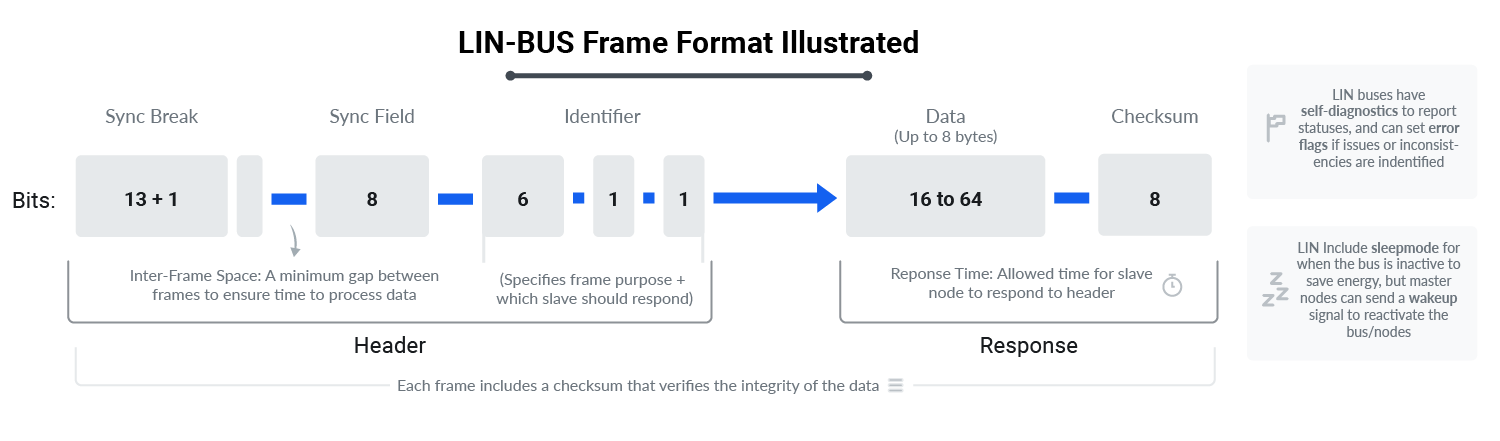
A LIN frame consists of a header and a response. The commander sends the header. The selected responder sends the response.
- Header: Contains the sync break, sync field and protected identifier.
- Response: Contains up to 8 data bytes and a checksum.
The protected identifier tells the network what the frame is for. The checksum helps detect corrupted data.
LIN bus timing
LIN communication is schedule-based. The commander decides when each frame is sent. This avoids collisions and makes the bus predictable.
The sync field allows responder nodes to align with the commander baud rate. The frame schedule defines when each header is sent and how much time responders have to answer.
This is one of the reasons LIN is well suited for simple actuator networks.
LIN topology and behavior
A typical LIN network has one commander and several responders.
The commander is often a body control module, door module, seat module or climate controller. Responders can be motors, switches, sensors or small local control modules.
Responders normally listen until the commander sends a header that matches their assigned frame. Then the relevant node responds with data.
This simple behaviour keeps the network easy to understand and cost-effective.
LIN error detection
LIN includes basic error detection.
The protected identifier uses parity bits, and the response includes a checksum. Nodes can also report status information to the commander.
LIN does not have the same level of error handling as CAN. That is acceptable because LIN is normally used for non-critical local functions.
If the application requires stronger fault handling, higher speed or multi-master behaviour, CAN or CAN FD is normally the better choice.
LIN sleep and wake-up
LIN supports low-power operation. When a LIN cluster is inactive, nodes can enter sleep mode.
The network can later be woken up by the commander or by a wake-up capable node, depending on the design.
This is important in body electronics, where many small modules are connected to the vehicle battery and must not drain power while the vehicle is parked.
Conclusion
LIN bus is a simple and cost-effective communication protocol used for low-speed local functions in vehicles.
It is not designed to replace CAN. It is designed to reduce cost and wiring complexity where CAN is more than the function requires.
In modern vehicle architectures, LIN is commonly used for windows, mirrors, seats, lighting, climate actuators and other body electronics.
CAN, CAN FD and Ethernet handle faster and more critical communication.
For vehicle data projects, LIN can be useful when the required signals are in body or comfort systems.
For powertrain, battery, diagnostics and high-speed ECU data, CAN and CAN FD are usually more relevant.
Related reading:
- Introduction to CAN Bus: Read the CAN bus guide.
- Basics of Telematics in Vehicles: Read the telematics guide.
- Using OBD2 for Vehicle Diagnostics: Read the OBD2 guide.


