




















 Cloud Login

Need a simple, practical intro to fleet management software?
Fleet management software is used to track vehicles, drivers, maintenance, fuel use and daily fleet operations.
The goal is not only to show vehicles on a map.
The goal is to give fleet managers better control over cost, uptime, safety and vehicle utilization.
Fuel costs can rise quickly. Vehicles can sit idle. Drivers can be delayed by traffic. Small maintenance problems can turn into expensive repairs if they are not handled early.
A good fleet management platform helps bring this data into one place.
It can show live position, vehicle status, diagnostic trouble codes, fuel use, idling, driver behaviour and service needs.
This makes it easier to react before a small issue becomes downtime.
This article explains what fleet management software is, how it works, which features matter and what to consider before choosing a system for your business.
What is fleet management software?
Fleet management software is software used to manage vehicles and related operations.
It can support many parts of the vehicle lifecycle, from acquisition and daily use to maintenance, reporting and replacement.
In practice, it gives the business one platform where vehicle data, driver information, service records and reports can be managed.
The system can be a standalone application or a cloud solution.
It is often used together with telematics hardware or an automotive data logger.
This hardware collects data from the vehicle and sends it to the software platform.
Depending on the vehicle and hardware, the platform can show values such as speed, position, fuel level, temperature, battery voltage, diagnostic trouble codes, door status and engine or machine data.

Fleet management software becomes most useful when it connects vehicle data with daily operations.
For example, a vehicle fault code is useful by itself.
But it becomes more useful when it is shown together with mileage, location, driver, time, fuel use and service history.
That gives the fleet manager better context and makes the next action more clear.
How does fleet management software operate?
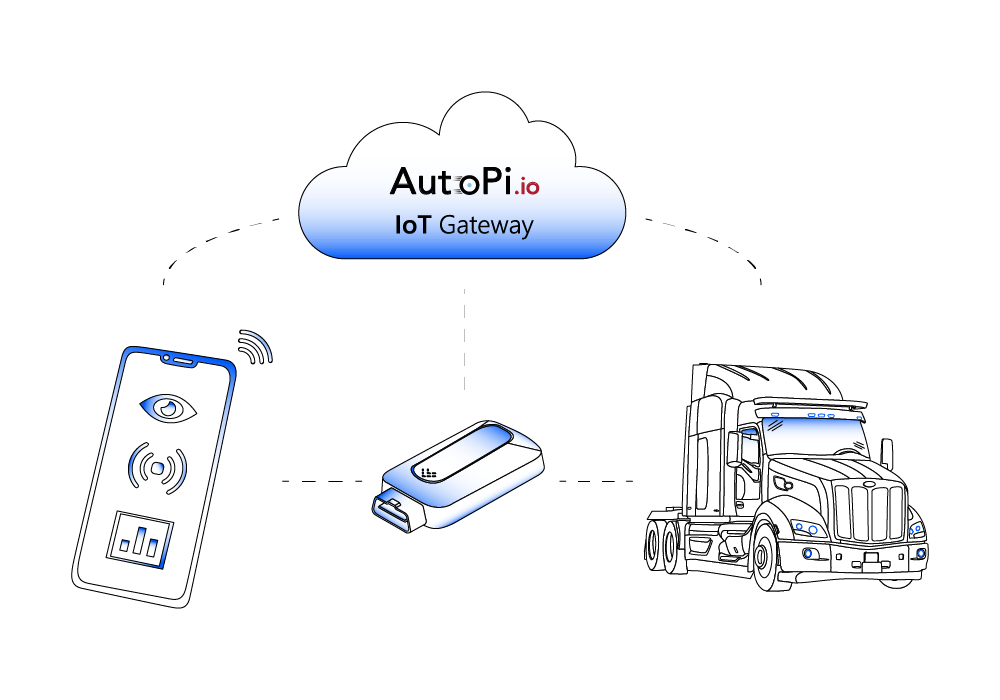
Fleet management software works by collecting data from vehicles, drivers and external systems.
The data is then shown in dashboards, reports, alerts or integrations.
The system is normally built around a telematics device installed in each vehicle.
The device can collect GPS position, movement data, selected vehicle data, diagnostic trouble codes and other telemetry.
This data is sent to a cloud platform where fleet managers can monitor the fleet.
A simple workflow looks like this:
- Vehicle data collection: A device reads GPS, CAN, OBD2, sensor data or other supported signals from the vehicle.
- Data upload: The device sends selected data to the fleet management platform through cellular, Wi-Fi or another connection.
- Dashboard view: Fleet managers see location, vehicle status, trips, alerts and reports in one place.
- Alerts and actions: The system can notify users about faults, idling, speeding, service needs or unusual behaviour.
- Reporting and integration: Data can be exported or shared with backend systems, APIs or business tools.
The result is a system that helps reduce manual work.
Instead of calling drivers, checking spreadsheets or waiting for a vehicle to return to the workshop, the fleet manager can see what is happening from the platform.
This can improve uptime, reduce cost and make operations easier to manage.

What features should fleet management software include?
A useful fleet management system should be simple to use, but still give enough detail to support real decisions.
The right features depend on fleet size, vehicle type, industry and reporting needs.
These are the core features most fleets should consider first:
- GPS tracking: GPS tracking shows where vehicles are and helps with dispatch, route planning, customer updates and recovery after delays.
- Hours of Service support: For regulated fleets, HOS records help document driver hours and reduce the risk of compliance issues.
- Maintenance and diagnostics: DTCs, mileage, engine hours and service alerts help plan maintenance before faults turn into downtime.
- Safety monitoring: Speeding, harsh braking, harsh acceleration and other driving events can be used to improve driver behaviour and reduce risk.
- Fuel consumption and idling: Fuel use and idle time tracking helps identify waste and reduce operating cost.
These features are often the difference between a simple tracking system and a useful fleet operation tool.
The best system is not always the one with the most features.
It is the one that gives the right data in a format that the team can actually use.
Fleet-management platforms vary a lot in cost and capability.
The table below gives a simple reference for comparing common feature levels.
| Feature | Basic Tier (Entry) | Mid-Market Tier | Enterprise Tier |
|---|---|---|---|
| GPS refresh rate | 30 s interval | 15 s interval | 5 s interval |
| Fuel monitoring | Daily aggregate only | Real-time tank level | Real-time + predictive burn model |
| Maintenance scheduling | Manual based on odometer | Automatic service alerts | Predictive, CAN-based fault codes |
| Driver behaviour scoring | Harsh event log | Weekly scorecards | Live ML risk index |
| Route optimisation | Not included | Static multi-stop | Dynamic traffic-aware |
| Open API access | CSV export | REST endpoints | REST + Webhooks + MQTT |
| CAN / FMS data | None | Speed & fuel-rate | Full CAN & CAN-FD stream |
| Over-the-air updates | Not supported | Firmware patches | Containerised apps & configs |
| Analytics dashboard | Preset widgets | Custom filters | Drag-and-drop BI toolkit |
Example cost breakdown
The figures below show an example for a delivery fleet with 50 vans using AutoPi hardware and cloud software.
The exact cost depends on hardware, subscription, installation, vehicle type and contract terms.
Use this as a structure for building your own total-cost calculation.
| Line Item | Unit Cost | Qty | Total | Notes |
|---|---|---|---|---|
| AutoPi TMU CM4 device | €235 | 50 | €11 750 | Includes dual-CAN, LTE, GPS, Wi-Fi |
| Professional installation | €20 | 50 | €1 000 | Approx. 5 min per vehicle with wiring kit |
| Cloud SaaS licence | €6 / vehicle / month | 12 months × 50 | €3 600 | Real-time tracking, reports, API access |
| Year-one outlay | €16 350 | |||
| Fuel savings | - €40 / vehicle / month | 12 months × 50 | - €24 000 | Idle reduction, route optimisation |
| Maintenance savings | - €10 / vehicle / month | 12 months × 50 | - €6 000 | Predictive servicing avoids breakdowns |
| Net year-one saving | €13 650 | Example payback in month 6 |
In this example, the ongoing fuel and maintenance savings can be higher than the yearly software cost.
For fleets above 50 vehicles, volume discounts may also change the calculation.
This can affect both subscription and hardware pricing.
What to search for when choosing fleet management software
Choosing fleet management software should start with the problem you want to solve.
A system that works well for delivery vans may not be enough for heavy machinery, EV fleets, rental vehicles or mixed fleets with several vehicle types.
The important thing is to check how the software handles your actual daily workflow.
Convenience of use
The software must be easy to use in daily work.
Key metrics should be visible without too many clicks. Dashboards should stay readable when the fleet grows and more data is added.
A good interface shows fuel, safety, vehicle status and utilization clearly, so the team does not waste time on manual exports or hard-to-read reports.
Accessibility
Fleet managers and drivers need access from the devices they actually use.
The platform should work in a browser, on tablets and on mobile devices.
Alerts, HOS logs, delivery status and vehicle events should be available without needing to sit at a desktop computer.
For field operations, connectivity issues should also be considered. The system should handle temporary coverage loss without losing important data.
Data from the fleet that can be used to make informed decisions
The platform should collect the data that matters for decisions.
This can include live location, fuel consumption, diagnostic trouble codes, service intervals, driver safety events and utilization.
The data should not only be stored. It should be shown in a way that makes the next action clear.
For example, which vehicle needs service, which driver behaviour should be followed up, or which vehicles are underused.
Ready to turn fleet data into real operational savings?
Deploy the AutoPi TMU CM4 or CAN-FD Pro to collect live vehicle data, send it to the cloud and use it for maintenance, reports and fleet visibility.
AutoPi can support small fleets, large fleets and custom vehicle data integrations where standard tracking is not enough.


